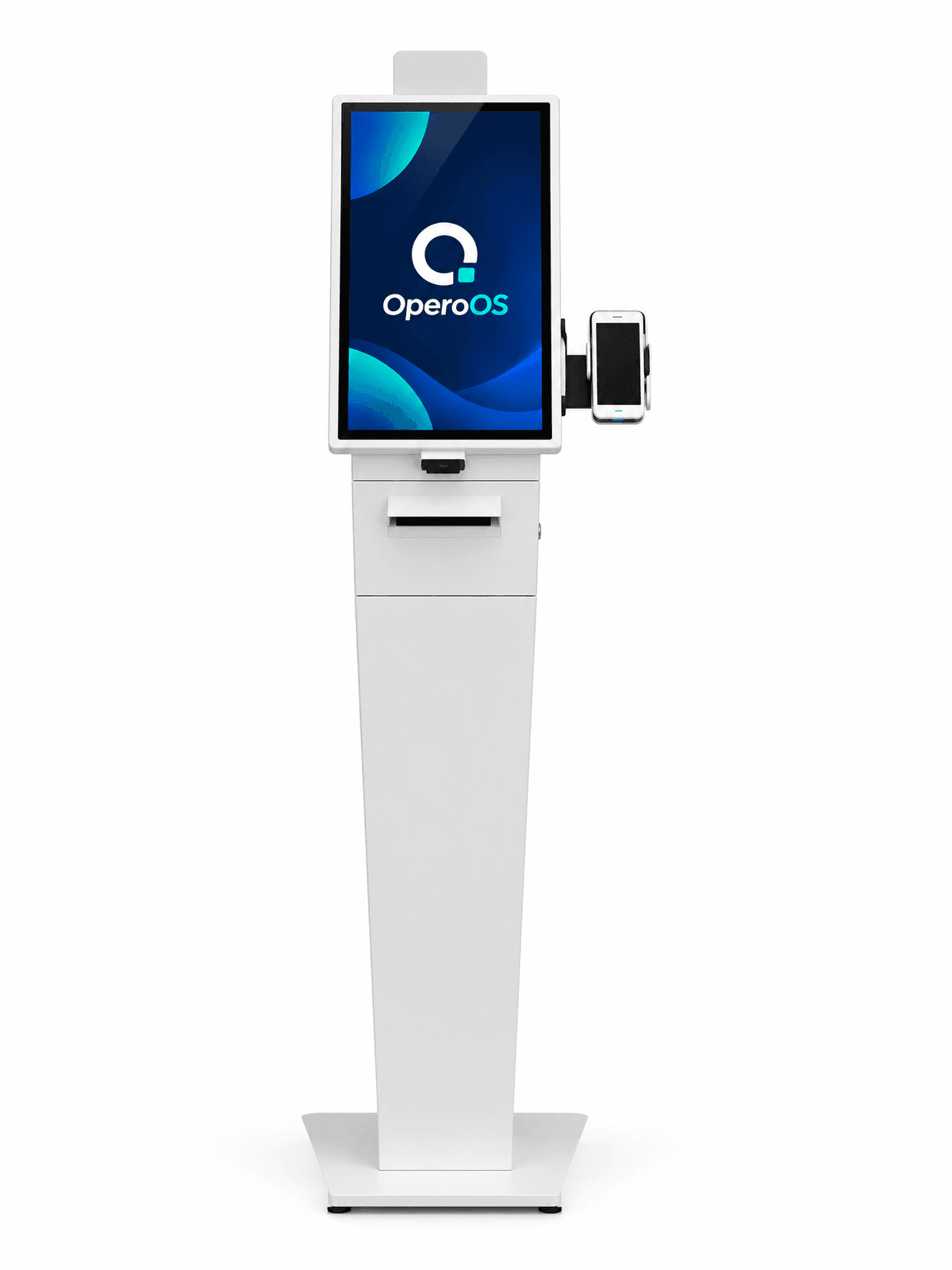
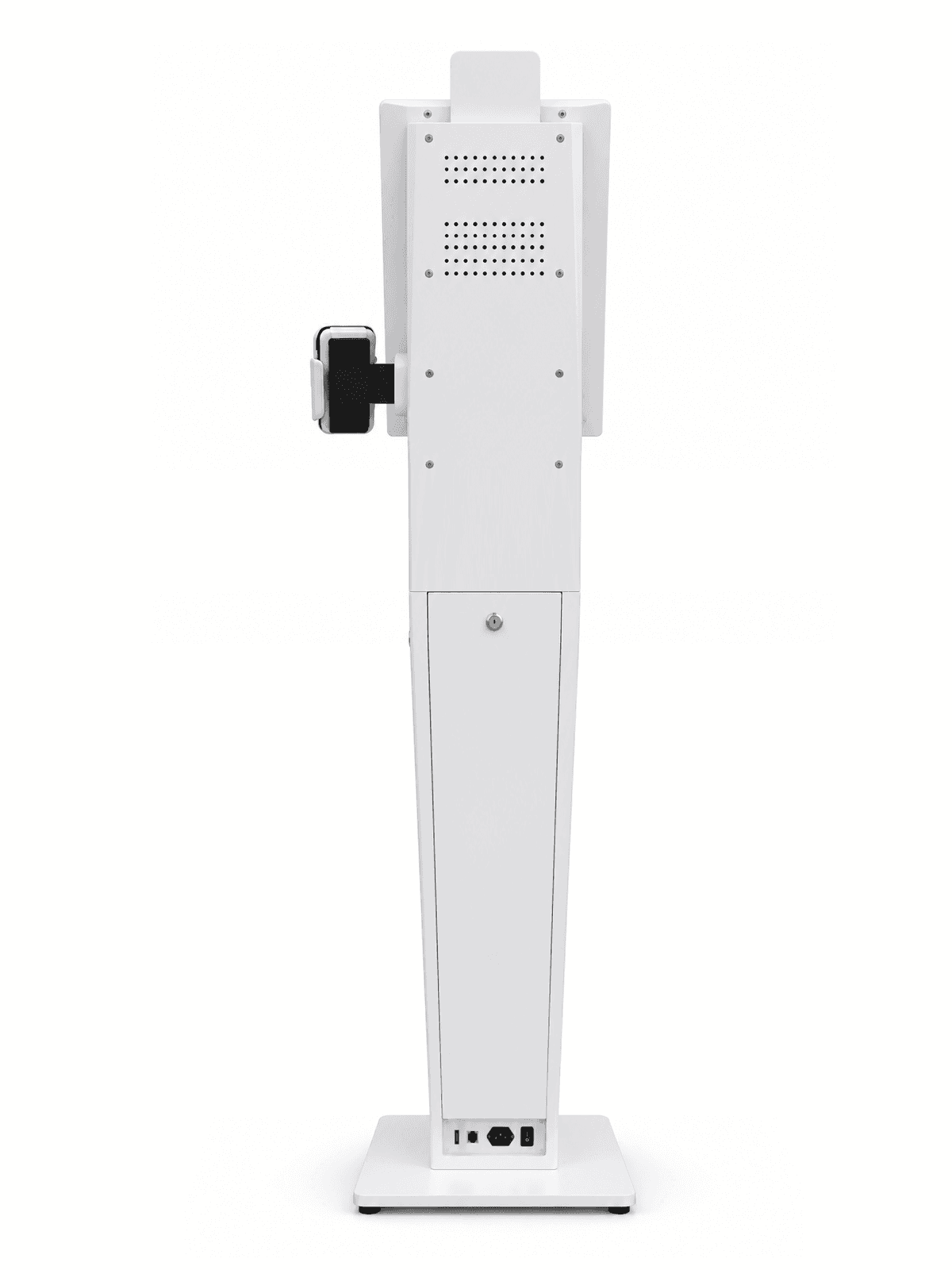
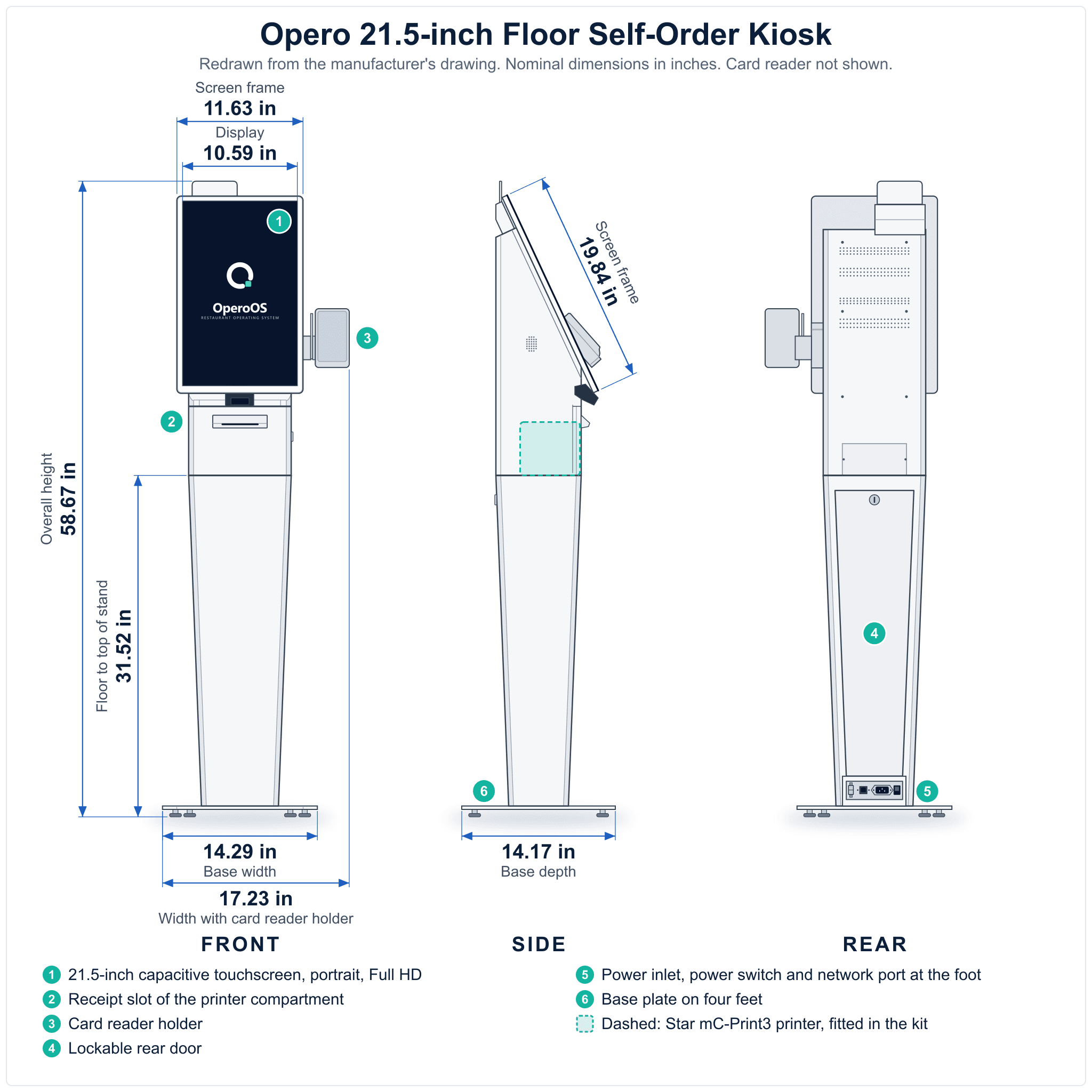
A self-order kiosk that stands on your Opero restaurant's floor. The kit is a 21.5-inch floor-standing touchscreen kiosk with a Star mC-Print3 receipt printer fitted in the printer compartment under the screen, and a holder on its side for a PAX A800 card reader. The kit price includes the Star mC-Print3 printer and the PAX A800 card reader. We fit the printer and print a test receipt in Allen, Texas, then ship the kit to you in two boxes, by parcel carrier: one holds the kiosk, the other its floor stand. The card reader is assigned to your restaurant's Opero payment account and ships to you separately from Finix, our payments provider. At setup you attach the kiosk to its floor stand, put the reader in the kiosk's holder, pair the kiosk to your location and add the card reader in Opero; we help by phone or video. We confirm the exact size, weight, system and what's in the box with you before we send your invoice.
What's in the box
- The 21.5-inch kiosk, portrait touchscreen, with the Opero app installed
- Its floor stand, which the kiosk attaches to at setup
- Star mC-Print3 receipt printer (MCP31Ci, black, Star part number 39659110), fitted in the printer compartment under the screen. Receipts come out of the slot below the screen
- The card reader holder, on the kiosk's right side
- PAX A800 card reader, assigned to your restaurant's Opero payment account. It ships to your restaurant separately from Finix and goes in the kiosk's holder at setup
- Setup instructions
Who can buy it
Only restaurants whose Opero account is live, with card payments approved, can buy this kit. The PAX A800 card reader works only with the Opero payment account it is assigned to. We check your account before we send an invoice.
How to order
- Request it in Opero: open Setup in Opero, sign in if asked, go to Hardware and choose this kit. Only the owner or an admin of the Opero account can request kits. Not on Opero yet? Ask us about this kit or see plans and sign up.
- We check your Opero account: live, with card payments approved. We also confirm the exact size, weight, system and what's in the box with you.
- We email you an invoice for the kit, its shipping and any white-glove setup. Paying the invoice means you agree to our Terms of Sale, Refund Policy and Shipping Policy.
- You pay the invoice online by card. We order the parts and build your kit only after it is paid. We email you when we have ordered the first part.
If your Opero account is not ready after you pay, we order nothing until it is. You have 14 days to fix it. If it is not fixed by then, we cancel the order and refund everything you paid.
No Opero account yet? Start at operoos.com.
Made to order
Ships 8 to 10 weeks after you pay, unless your invoice gives another ship date or ship time before you pay. If your kit will be late, we email you before then with a new date, or to say that we do not yet know one, and you choose whether to wait or to cancel for a full refund. Delivery by parcel carrier takes a few more days after it ships.
Shipping
- We quote the shipping for your kit on your invoice, so you see it before you pay. It depends on where the kit goes.
- We deliver only to business addresses in the contiguous 48 states and Washington, D.C. No home addresses, no PO boxes.
- The kit ships in two boxes, by parcel carrier, to your business address. Someone must be there during business hours to sign for them.
- If the carrier cannot deliver a box, it tries again or holds it for you. We do not bill you later for redelivery, storage or address correction charges. If the carrier sends a box back to us because it could not deliver it, we ship it to you again at no extra charge once you confirm the address and that someone will be there to sign.
- Look at both boxes when they arrive. If one is damaged, take photos of it before you open it. Email support@operoos.com about any damage, including damage you find when you unpack the kit, within 7 days of delivery. Then we repair or replace the damaged parts, or the whole kit.
- Unpack and check the kit for damage within 7 days of delivery, even if you do not plan to set it up yet, and keep both boxes and all the packing. We make the carrier claim ourselves. If you tell us about damage more than 7 days after delivery, we do not repair or replace it. If you booked a setup visit, see Setup below.
- If you refuse a kit that is not damaged, it comes back to us as an unopened return (see Returns).
Setup
The kit arrives in two boxes. You attach the kiosk to its floor stand, following the setup instructions in the box, and we help you by phone or video call.
Want us to do it? With white-glove setup, we come to your restaurant and set the kit up with you, including attaching the kiosk to its floor stand. It is one fee per location, travel included. Ask for it in your request, and we add it to your invoice.
- Book the visit for a date within 90 days of the kit's delivery. If you have not booked it by then, we refund the setup fee. Once a date is booked, we can move it to a later date, also past those 90 days, if we both agree by email.
- Before the visit, the kit must be delivered, with a power outlet and internet at the kiosk's spot, and someone who can sign in to your Opero account as an owner or manager. Checking the kit for delivery damage within 7 days of delivery is still up to you: unpack both boxes, look at the screen, the floor stand and the holder, and keep the boxes and all the packing (see Shipping above). If you did that check, damage we find on the visit on a part it could not show counts as reported in time.
- To move the visit, tell us at least 7 days before. With less notice, you pay the extra travel costs the change causes. We tell you the amount first.
- To cancel the visit, tell us at least 7 days before, and we refund the setup fee. With less notice, we keep the travel costs we have already paid and cannot get back.
- If the site is not ready and we have to come back, the second visit is charged in full.
- If the card reader has not arrived from Finix by the visit, we add it in Opero with you by phone or video when it comes, at no charge.
- We do not take the boxes or packing away.
Cancelling
You can cancel for free, with a full refund, until we email you that we have ordered the first part for your kit. After that, until the kit ships, you can still cancel: we refund everything you paid except a fee of 15% of the kit price shown on your invoice. No sales tax is charged on the fee, and we refund all the sales tax you paid. If we have told you your kit will be late, you can cancel with no fee. Once the kit ships, it cannot be cancelled; see Returns.
Returns
Once the kit is installed or powered on, it cannot be returned. An unopened kit can be returned if you ask within 14 days of delivery. Unopened means never installed or powered on, with all parts and packing sent back. Opening the boxes and unpacking the kit to check for damage is fine, as long as you keep all the packing. Fitting the kiosk on its floor stand does not by itself count as installing it, as long as it has never been powered on and you take it off the stand and pack every part back as it came. We send you a return label or book a parcel pickup. We refund the kit price less a 15% restocking fee and less what the return shipping actually costs us, plus all the sales tax you paid on the kit and on its shipping charge. The shipping charge is not refunded. White-glove setup that has not happened is refunded in full. See our Refund Policy.
A part that does not work at first setup
If the kiosk, printer or card reader does not work when you first set the kit up, email support@operoos.com within 7 days of delivery. For a card reader that Finix ships to you, the 7 days run from the day it arrives. The same 7 days apply if the card reader arrives damaged in its box from Finix. We help by phone or video first. If it is a fault, we replace the part, and we pay the shipping both ways. If we cannot repair or replace a part that was damaged in delivery or did not work at first setup, we refund what you paid for it, including its share of the shipping and sales tax.
Warranty
Opero warrants the kiosk for 1 year from delivery to your restaurant. If it fails in that year, we repair or replace it, at our option, and we pay the shipping both ways. If we cannot do either in the time our Opero Hardware Warranty page gives, we refund what you paid for the kiosk, including its share of the shipping and sales tax. The Star mC-Print3 printer carries Star's warranty, and the PAX A800 card reader carries Finix's. For any of the three, email us first: we handle the Star or Finix claim for you.
- A replacement kiosk, part or card reader may be refurbished.
- A repair or replacement does not start a new year.
- If you sell your restaurant with the kiosk, the warranty goes with it. If the kiosk is sold on its own, it does not.
- Not covered includes: delivery damage not reported as our Refund Policy asks; outdoor, patio or drive-through use; washing it down or liquid damage; power surges, or power that does not come from a normal grounded outlet; damage from moving the kiosk, other than a move we make on a setup visit, and from accidents; fire, theft or vandalism; repairs or parts we did not make or approve; software other than Opero; scratches and wear that do not stop it working.
See our Opero Hardware Warranty page for everything the warranty does not cover and the full terms.
What you need
- An Opero account, live, with card payments approved
- A business address in the contiguous 48 states or Washington, D.C., with someone there during business hours to sign for the delivery
- Floor space for the kiosk, with a grounded power outlet and internet at that spot
- 3 1/8 in thermal paper rolls for the printer (not included)
Specifications
| Screen | 21.5-inch capacitive touchscreen, 10-point touch, portrait, Full HD (1080 x 1920) |
|---|---|
| Mounting | Floor-standing, on its own floor stand, with the screen tilted back |
| Size | About 58.7 in tall, 17.2 in wide with the card reader holder, 14.2 in deep |
| Weight | About 78 lb assembled |
| Printer | Star mC-Print3 (MCP31Ci, black), fitted in the printer compartment under the screen; receipts come out of the slot below the screen; 3 1/8 in paper |
| Card reader | PAX A800 in the holder on the kiosk's right side |
| Shipping | Two boxes, by parcel carrier: the kiosk, and its floor stand |
| Lead time | Ships 8 to 10 weeks after you pay, unless your invoice gives another ship date or ship time before you pay |
| Warranty | Kiosk: 1 year from delivery to your restaurant, from Opero. Printer: Star's warranty. Card reader: Finix's warranty. Opero handles every claim for you |